
StarCosmetic
A Simple, Convenient, and User-Friendly Cosmetics Plugin
Cosmetics That Feel Like Part of Minecraft
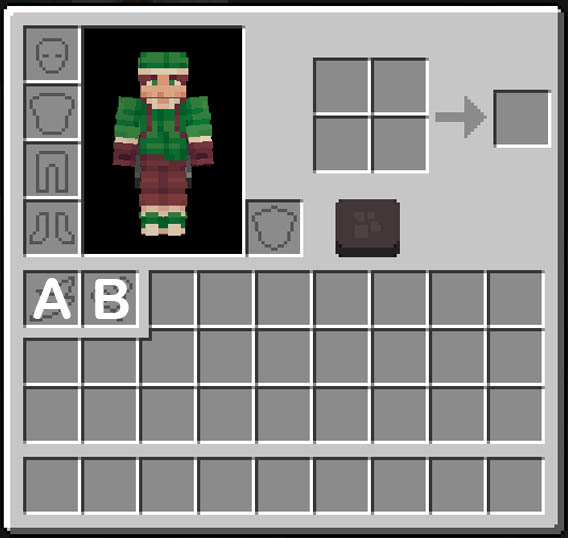
StarCosmetic adds dedicated backpack and balloon slots directly to the player’s inventory. Players can manage their cosmetics naturally without navigating additional menus or memorizing complicated commands.
Right-click to equip
Shift + left-click to unequip
Drag and drop items directly into their cosmetic slots
No client-side mods required
Compatible with vanilla Minecraft clients and resource packs
Supports Paper 1.21.11+ and newer
Backpacks move with the player, while balloons feature visible leads, floating movement, and momentum-based animations.
Key Features
Separate slots for backpacks and balloons
Customizable placeholder icons for each slot
Support for Custom Model Data and Item Models
Compatible with vanilla items and custom items from other plugins
Prevents regular or incorrectly typed items from entering cosmetic slots
Responsive backpack movement without noticeable trailing
Animated balloons with leads and movement physics
Cosmetics are visible to nearby players
Configurable models, positions, and animations
Player Guide
Equipping a Cosmetic
Hold a registered cosmetic item and right-click. The plugin automatically moves it into the correct equipment slot.
Players may also open their inventory and drag the item into its corresponding cosmetic slot. Invalid items or cosmetics of the wrong type will be rejected with a notification.
Unequipping a Cosmetic
Shift + left-click an equipped cosmetic to move it back into the player’s inventory.
If the inventory is full, the cosmetic will remain equipped to prevent item loss.
Cosmetic Slots
Slot
A— BackpackSlot
B— Balloon
Each slot has its own configurable placeholder. Server owners can customize its material, Custom Model Data, Item Model, and tooltip visibility.
Registering Cosmetic Items
Only server operators can register new cosmetic items.
/scos save cosmetic [name]
/scos save balloon [name]
Examples:
/scos save cosmetic red_backpack
/scos save balloon pink_balloon
The name is optional. If omitted, StarCosmetic automatically generates a unique identifier.
The same item cannot be registered more than once or assigned to multiple cosmetic types. If an item has already been registered, the plugin displays its existing name.
Commands
Register an Item
/scos save cosmetic [name]
/scos save balloon [name]
Give a Cosmetic to a Player
/scos give <player> cosmetic <name>
/scos give <player> balloon <name>
Delete a Registered Cosmetic
/scos delete cosmetic <name>
/scos delete balloon <name>
Additional Commands
/scos list
/scos reload
All commands include tab completion for available arguments, player names, cosmetic types, and registered items.
Permissions
starcosmetic.useAllows players to use the cosmetic slots and equip registered items. Granted to all players by default.
starcosmetic.adminAllows access to administrative commands. Granted to server operators by default.
Registering new items with /scos save is restricted directly to server operators.
Backpack System
Rendered using an invisible Armor Stand
Moves and rotates with the player
Adjusts its position while the player is sneaking
Visible to nearby players
Configurable position and Armor Stand size
Balloon System
Renders the model using an invisible Armor Stand
Includes a visible lead connected to the player
Features drag and momentum-based movement
Uses a natural floating animation
Visible to nearby players
Configurable position and animation behavior
Vanilla Minecraft Compatibility
Players can connect using an unmodified vanilla Minecraft client. No client-side mods are required.
Supported features include:
Vanilla Minecraft items
Custom Model Data
Modern Item Models
Resource packs
Custom items that store their data within the ItemStack
Paper 1.21.4 and newer (Test 1.21.4-26.1.2)
Player State Management
StarCosmetic automatically manages cosmetics when a player:
Joins the server
Leaves the server
Is disconnected from the server
Dies or respawns
Changes worlds
Teleports
This helps prevent leftover Armor Stands or balloon entities from remaining in the world.
Configuration Files
config.yml
Controls cosmetic slots, placeholders, models, backpack positioning, balloon animations, and plugin messages.
cosmetics.yml
Stores the complete ItemStack data of registered backpacks and balloons.
Managing registered items through the plugin’s commands is recommended instead of editing this file manually.
Ready for Future Development
StarCosmetic is actively open to community feedback, bug reports, and feature suggestions.
Future updates can be shaped by the needs of players and server owners, helping StarCosmetic remain easy to use, flexible, and suitable for a wide range of Minecraft servers.
Optional Resource Pack Add-on
StarCosmetic includes an optional resource pack add-on containing the inventory GUI and cosmetic slot icons shown in the showcase video.
Please note that the backpack and balloon model collection featured in the video is not included.
The add-on pack includes:
Inventory GUI assets
Backpack and balloon slot icons
ItemsAdder setup files
Nexo setup files
This add-on is optional. StarCosmetic can still be used with your own resource pack, Custom Model Data, Item Models, and custom cosmetic designs.
Ready to create something amazing?
Join the MCModels community and start building your dream projects today.
