
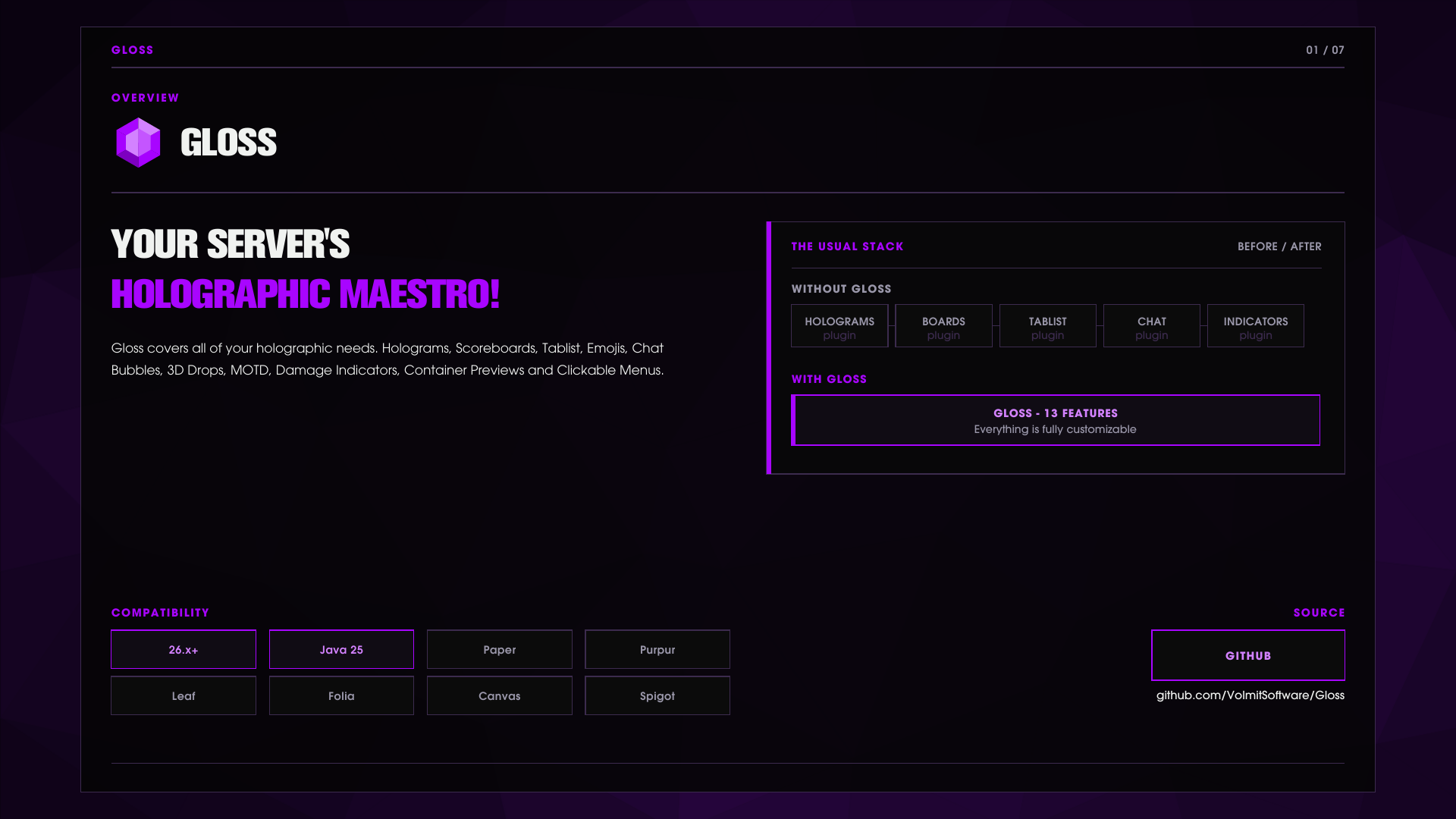
您的服务器的全息指挥家
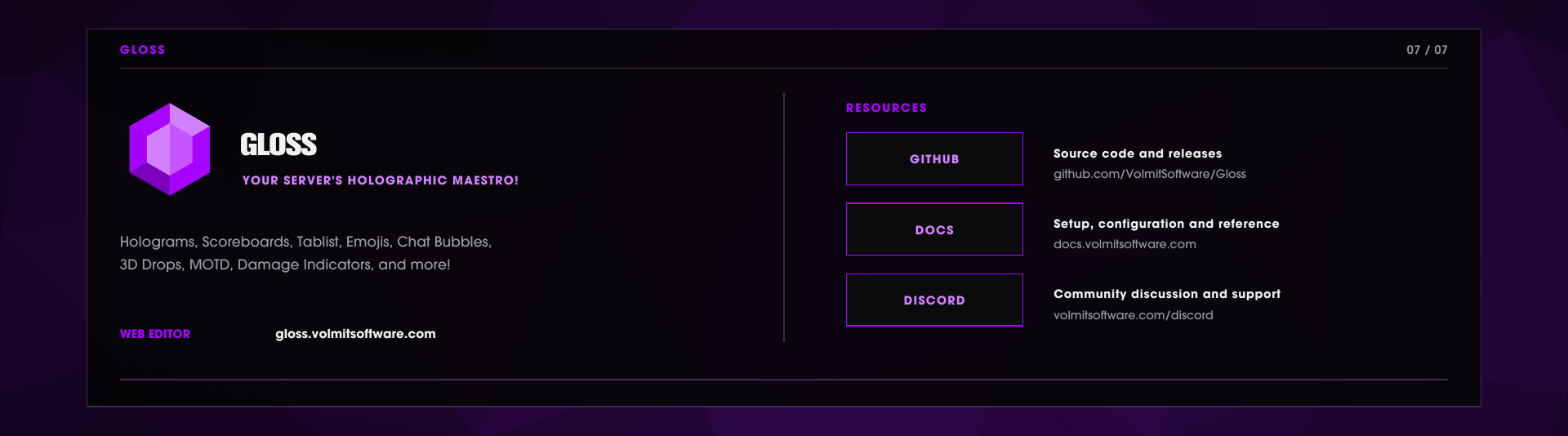
WEB EDITOR • GITHUB • DOCUMENTATION • DISCORD
Overview - what Gloss does
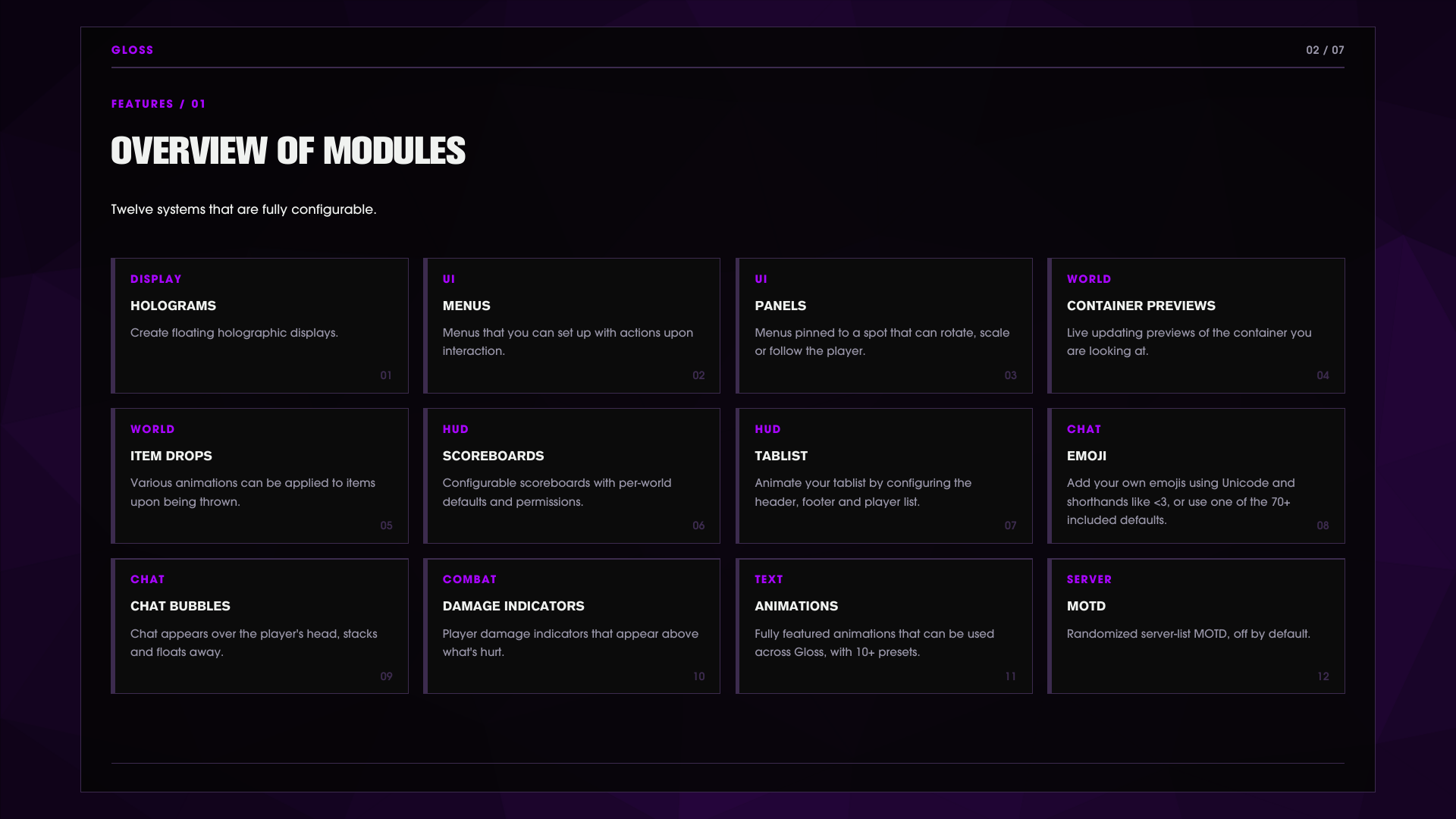
Gloss 是一个整体的全息图和用户界面显示套件。它是一个插件,替代了大多数其他插件,如 MOTD、记分板、标签列表、表情符号等。
Holograms 基于 TextDisplay 的浮动文本,具有每个玩家的占位符渲染、可热加载的 JSON 文件、文本到方块艺术的渲染和完整的命令管理。
Holographic menus 可点击的世界内用户界面,具有按钮、开关、页面导航、悬停动画和从物品、方块、实体、玩家头像、图像或自定义物品插件绘制的图标。
World panels 持久的世界锚定菜单,您可以定位、旋转、缩放、对齐,甚至附加到玩家。
Container previews 查看箱子、熔炉、酿造台、漏斗或其他十个容器, holographic card 渲染其实时内容。
Real drops 掉落的物品变成有重力的、翻滚的显示模型,带有浮动标签、可选的真实物理(弹跳、浮力)和可编写脚本的动画层。
Scoreboards JSON 定义的侧边栏,具有主要/世界默认值、权限限制的面板和每组默认值。
Tablist 可配置的页眉/页脚和每组玩家列表名称。
Emoji
:emoji:并在聊天中触发替换,具有标签补全和每个表情符号的权限,预构建了 71 个,您可以轻松添加更多。Chat bubbles 消息在说话者的头上浮动,堆叠,并在过期时飞走,具有每个世界和每组样式。
Damage indicators 浮动的伤害和治疗数字,具有弹道运动,从实际应用的健康增量中测量。
Animations 基于帧的文本动画,可在任何全息图、记分板或标签列表行中使用,格式为 |animation.<id>|。
MOTD 随机化、颜色过滤的服务器列表 MOTD(默认关闭)。
在 Gloss 中,一切都是完全可配置的,您可以使用 Web 编辑器轻松预览更改,提供数十个随机输出以帮助您选择适合您的内容。所有配置更改在文件保存后或从 Web 编辑器推送到服务器时会立即热加载。
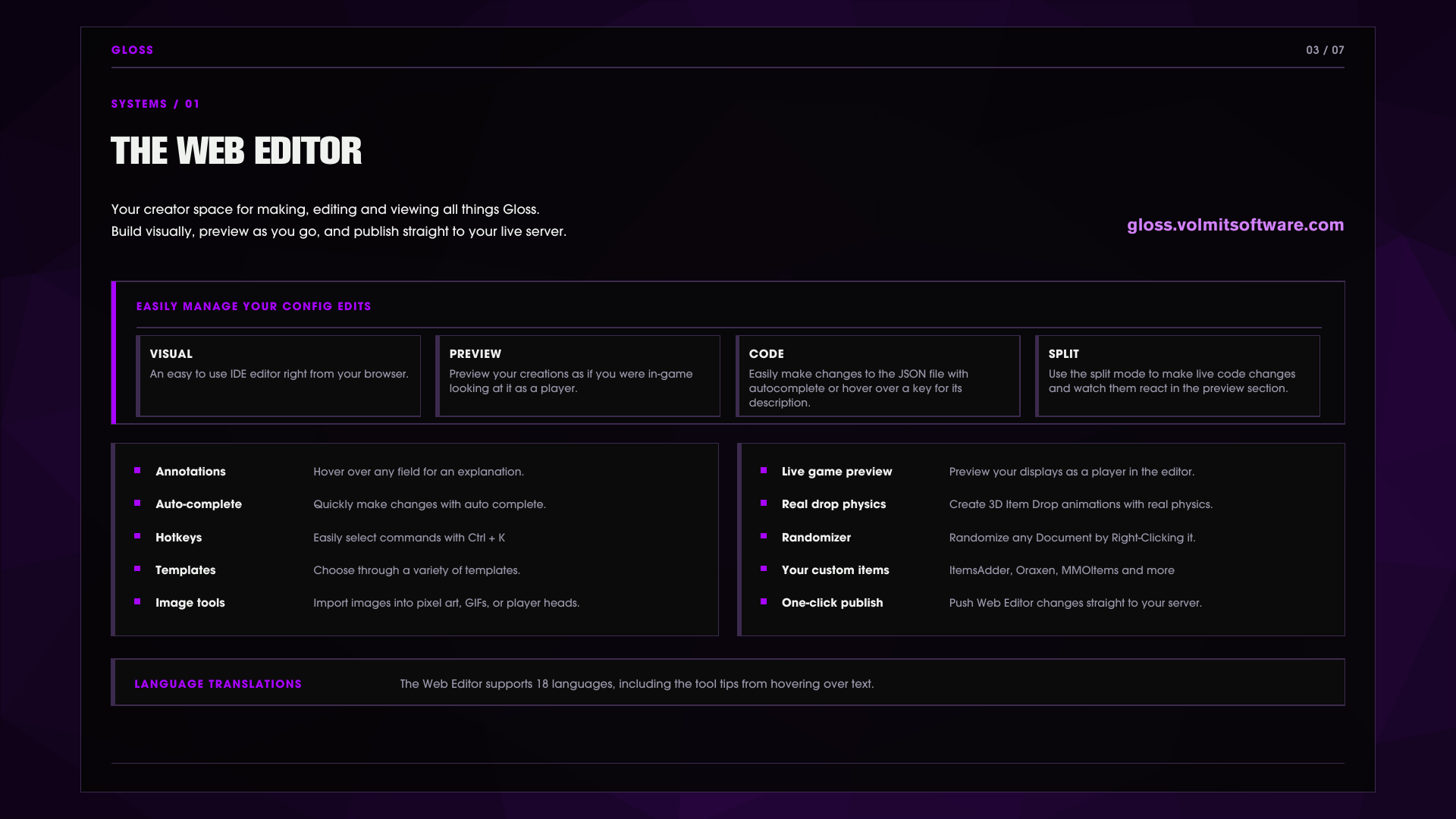
Web editor - build menus and panels in your browser
查看 Web 编辑器以轻松创建您的菜单: gloss.volmitsoftware.com。您可以以可视化方式布局菜单、面板、掉落动画脚本、容器预览等,具有实时预览。
Live two-way sync 运行 /gloss menu edit <menu> 或 /gloss panel web <panel>,Gloss 会给您一个可点击的链接,打开编辑器中的文档。从浏览器发布,服务器在几秒钟内拉取更改,验证并通过原子事务写入,并自动备份之前的内容。
/gloss sync list       Active editor sessions
/gloss sync status     Relay and session state
/gloss sync pull       Poll the relay now
/gloss sync revoke     Kill a session immediately
Your custom items, in the editor /gloss items export 会写入 custom-items.json,以便编辑器可以浏览您服务器上的每个 ItemsAdder、Oraxen、Nexo、MMOItems、Slimefun 等。
Sessions are guarded 同步会话会过期(默认 60 分钟),大小受限,并检测修订冲突,因此两个编辑器不能静默覆盖彼此。
编辑器写入的所有内容都是您插件文件夹中的纯 JSON。您可以随时手动编辑文件或通过 Web 编辑器的拆分视图进行编辑。
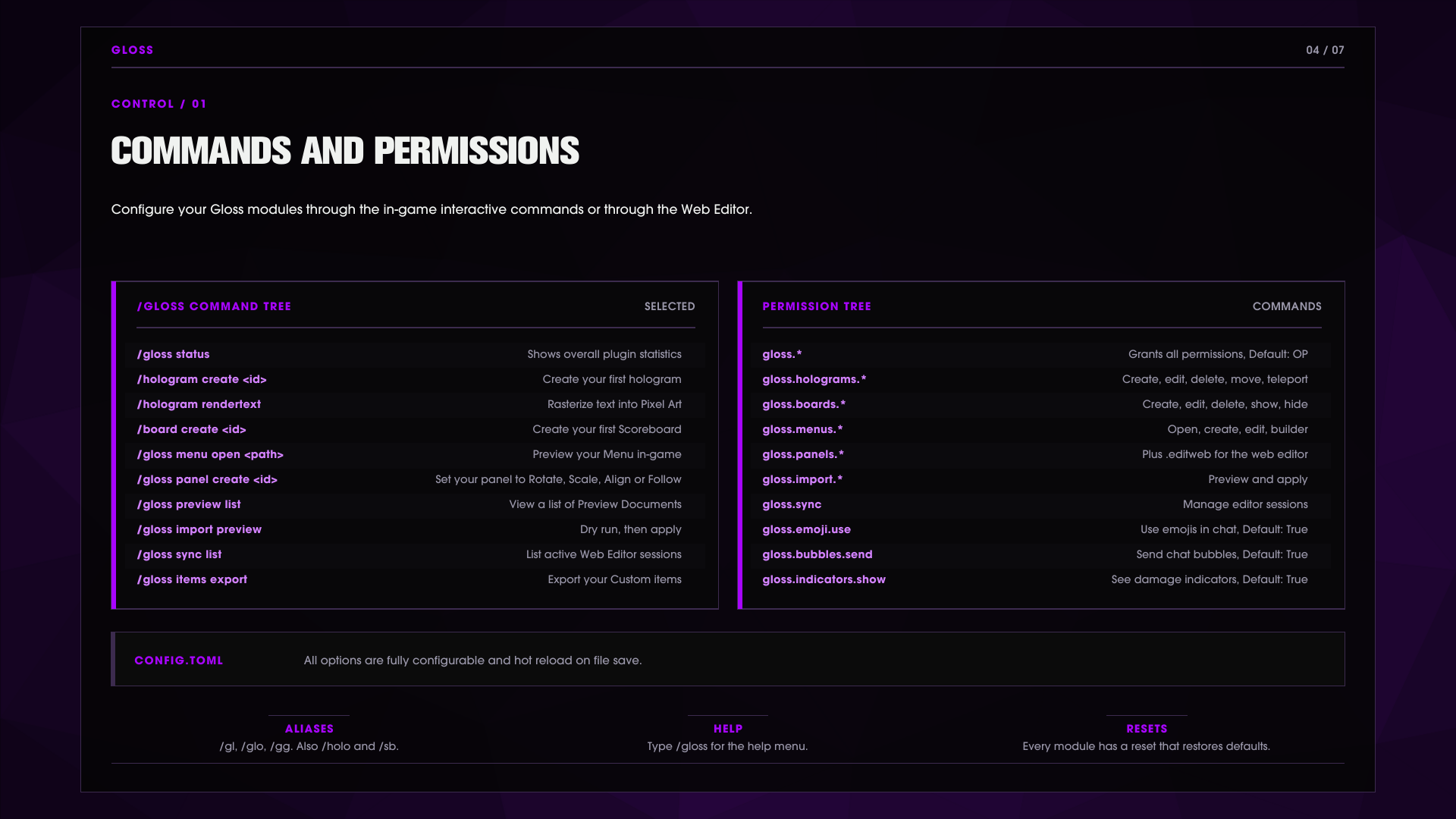
Commands and permissions
主要命令是 /gloss。别名 /gl, /glo, /gg
附加别名: /hologram, /holo, /h, /board, /sb, /bd
/gloss status                                  Shows everything that is loaded.

/gloss hologram create|delete|list|info              Manage holograms
/gloss hologram addline|setline|removeline|clear
/gloss hologram move|movehere|tp|orient              Position and facing
/gloss hologram rendertext                           Rasterize text into block-art lines

/gloss board create|delete|title                     Manage sidebars
/gloss board addline|setline|removeline
/gloss board show|hide|primary|permission|reset

/gloss menu list|create|open|edit|builder|new|copy
/gloss menu addrow|insertrow|setrow|removerow|offsetrow|seticon|style|image

/gloss panel create|delete|list|near|info|rename|copy
/gloss panel move|here|tp|rotate|scale|align|follow|unfollow
/gloss panel ranges|visibility|permissions|edit|web|save|cancel

/gloss preview list|reset|dump                 Container preview documents
/gloss item status|export                      Custom item providers / editor export
/gloss sync list|status|revoke|pull            Editor sync sessions
/gloss import preview|apply|holoui|legacy
/gloss emoji list|reset                        Click an emoji to insert it into chat
/gloss animations list|reset
/gloss bubbles style|reset                     Pick your personal bubble style
/gloss tablist reset  /gloss motd reset  /gloss drops reset
单独运行 /gloss 会打开一个分页的悬停和点击帮助菜单。列表条目是可点击的,单击全息图以传送到它,单击表情符号以插入它。标签补全在任何地方都有效。
Permissions 遵循命令树。所有内容都挂在 gloss.*(默认:op):
gloss.*                    Parent of every node below. Grants the whole plugin.
gloss.admin                Reset subcommands: emoji, animations, bubbles, tablist, motd, drops

gloss.holograms            Parent of the five hologram nodes. Base access to /hologram
gloss.holograms.create     Create holograms and add lines
gloss.holograms.edit       Edit lines, rename, rendertext
gloss.holograms.delete     Delete holograms
gloss.holograms.move       Move, movehere, orient
gloss.holograms.teleport   Teleport to a hologram

gloss.boards               Parent of the five board nodes. Base access to /board
gloss.boards.create        Create sidebars
gloss.boards.edit          Title, addline, setline, removeline
gloss.boards.delete        Delete sidebars
gloss.boards.show          Show a board to yourself or others
gloss.boards.hide          Hide a board

gloss.menus                Parent of the eight menu nodes. Base access to /gloss menu
gloss.menus.list           List menu documents
gloss.menus.open           Open a menu
gloss.menus.close          Close an open menu
gloss.menus.move           Reposition an open menu
gloss.menus.back           Navigate the page stack
gloss.menus.create         Create new menu documents
gloss.menus.edit           Edit rows, icons, styles, images
gloss.menus.builder        The in-game menu builder

gloss.panels               Parent of the panel nodes. Create, move, rotate, scale, align, follow
gloss.panels.editweb       Open a panel in the web editor (/gloss panel web)

gloss.preview              See container previews and adjust their scale
gloss.sync                 Manage web editor sync sessions (list, status, pull, revoke)
gloss.import               Parent of the import nodes. Dry-run previews (/gloss import preview)
gloss.import.apply         Actually apply an import

gloss.emoji.use            Use emoji in chat                      default: true
gloss.bubbles.send         Your chat renders as bubbles           default: true
gloss.indicators.show      See damage and heal indicators         default: true
gloss.chat.color           Use color codes in chat                default: op
gloss.bubbles.style        Pick a personal bubble style           default: op
每个节点都是 默认:op 除非另有标记。授予父级(gloss.menus)会授予其子级;三个面向玩家的节点默认对所有人开放。
Configuration
在 Gloss 中,一切都是可配置的,所有选项在保存时热加载,无需重新加载更改。
# Configuration - gloss
# This file is canonicalized on load; comments and new keys may update automatically.
#
# Gloss runtime configuration. Every knob is emitted with a comment,
# values outside their documented range are clamped back on load,
# and edits hot-reload while the server runs.

# Prints the Gloss splash screen during startup.
splashScreen = true
# Sends anonymous bStats usage metrics.
metrics = true

# Settings for Features.
[features]
# Enables the hologram engine.
holograms = true
# Enables scoreboard sidebars.
boards = true
# Enables tablist header/footer and list-name management.
tablist = true
# Enables emoji replacement in chat and content.
emoji = true
# Enables text animations.
animations = true
# Enables chat bubbles above players.
chatBubbles = true
# Enables floating damage and heal indicators.
damageIndicators = true
# Enables custom names on dropped item stacks.
drops = true
# Replaces vanilla dropped-item rendering with grounded,
# tumbling display models and display-backed labels.
realDrops = true
# Enables holographic menus.
menus = true
# Enables world-anchored panels.
panels = true
# Enables look-at container previews.
previews = true
# Enables the custom server list MOTD.
motd = false

# Settings for Hotload.
[hotload]
# Ticks between polls of watched files for hot reloading. Clamped to 1..200.
watchIntervalTicks = 5

# Settings for Holograms.
[holograms]
# Vertical distance in blocks between stacked hologram lines. Clamped to 0.05..2.0.
stackDistance = 0.26
# Ticks between hologram text refreshes. Clamped to 1..200.
updateIntervalTicks = 10
# Distance in blocks at which holograms become visible. Clamped to 4..128.
viewRange = 48.0
# Renders complete placeholder, function and expression tokens
# per viewing player instead of once globally.
perViewerPlaceholders = true
# Ticks between refreshes of temporary holograms. Clamped to 1..20.
temporaryUpdateIntervalTicks = 2
# Uses client-side Display interpolation for moving temporary holograms,
# falling back to teleports when the server API lacks it.
interpolatedMotion = true
# Drives fast animated hologram lines from a dedicated async thread instead of the tick updater.
highFrequencyAnimations = true
# Maximum frames per second the high-frequency animation thread targets. Clamped to 1..240.
maxAnimationFps = 120
# Animation text packets per second allowed across each animated
# display's audience; large audiences degrade frame rate proportionally. Clamped to 100..1000000.
animationPacketBudget = 20000
# Maximum width in characters for rendered text art. Clamped to 8..128.
textArtMaxWidth = 48

# Settings for Boards.
[boards]
# Ticks between scoreboard refreshes. Clamped to 1..200.
updateIntervalTicks = 20

# Settings for Tablist.
[tablist]
# Ticks between tablist refreshes. Clamped to 1..400.
updateIntervalTicks = 40

# Settings for Groups.
[groups]
# Resolves player groups through Vault when it is installed.
useVault = true

# Settings for Emoji.
[emoji]
# Requires a per-emoji permission instead of the global emoji permission.
emojiSpecificPermissions = false
# Offers emoji triggers in chat tab completion.
tabComplete = true

# Settings for Text.
[text]
# Resolves PlaceholderAPI placeholders in rendered text.
placeholders = true
# Resolves |function| expressions in rendered text.
functions = true

# Settings for Chat.
[chat]
# Translates color codes in player chat for permitted players.
color = true

# Settings for Chat bubbles.
[chatBubbles]
# World folder names where chat bubbles never appear.
blacklistWorlds = []

# Settings for Damage indicators.
[damageIndicators]
# Random sideways force applied to spawned indicators. Clamped to 0.0..2.0.
randomThrowForce = 0.08
# Initial upward force applied to spawned indicators. Clamped to 0.0..2.0.
initialUpForce = 0.13
# Gravity pull applied to indicators each tick. Clamped to 0.0..1.0.
gravityFactor = 0.0093
# Maximum indicators spawned per second before new ones are dropped. Clamped to 1..1000.
maxPerSecond = 40
# Milliseconds an indicator stays alive. Clamped to 250..30000.
maxMsAlive = 3000
# Color-code prefix applied to damage numbers.
damagePrefix = "&c&l"
# Color-code prefix applied to heal numbers.
healPrefix = "&a&l"
# Decimal places shown on indicator numbers. Clamped to 0..2.
decimals = 0
# Shows heal indicators in addition to damage indicators.
showHeals = true

# Settings for Drops.
[drops]
# Name format for dropped item stacks; {count} and {type} are replaced.
nameFormat = "&7{count}x {type}"
# Name format for dropped bundles that carry stacks; {total}
# and {contents} are replaced. Empty bundles use nameFormat.
bundleFormat = "&7Bundle &8(&7{total} items&8): &7{contents}"
# Bundle content entries listed before the rest collapse into a +N more suffix. Clamped to 1..10.
bundleEntryLimit = 3
# Uses a vertical TextDisplay label for bundles while realDrops is enabled.
bundleVerticalLabels = true
# Header format for vertical bundle labels; {total} is replaced.
bundleHeaderFormat = "&eBundle &8(&e{total} items&8)"
# Entry format for vertical bundle labels; {count} and {type} are replaced.
bundleEntryFormat = "&7- &f{count}x {type}"
# Remainder format for vertical bundle labels; {remaining} is replaced with
# the hidden material count.
bundleMoreFormat = "&8+{remaining} more"
# Leaves custom names other plugins already set on dropped items untouched.
preserveCustomNames = true
# Uses an item's display name from its item meta as {type} instead of the material name.
useItemDisplayNames = true

# Settings for Commands.
[commands]
# Plays feedback sounds when command output is delivered.
sounds = true

# Settings for Debug.
[debug]
# Renders menu hitbox debug outlines for all sessions.
hitbox = false
# Renders menu position debug markers for all sessions.
position = false
# Logs high-frequency animator loop statistics every 10 seconds.
animator = false

# Settings for Editor.
[editor]
# Base URL of the hosted web editor; must be a plain http(s) link or the default is used.
builderUrl = "https://gloss.volmitsoftware.com"

# Settings for Sync.
[editor.sync]
# Enables live editor sync sessions through the relay.
enabled = true
# Relay endpoint URL; must be https (or loopback http) ending in /v2 or the default is used.
endpoint = "https://sync.gloss.volmitsoftware.com/v2"
# Relay session creation token of 22..128 characters from A-Z, a-z,
# 0-9, _ and -; anything else is treated as empty.
createToken = ""
# Minutes an editor sync session stays alive. Clamped to 5..1440.
sessionMinutes = 60
# Seconds between relay polls during an active session. Clamped to 1..60.
pollSeconds = 3
# Maximum editor sync project size in mebibytes. Clamped to 1..32.
maxProjectMiB = 8

# Settings for Preview.
[preview]
# Distance in blocks the look-at raycast reaches for container previews. Clamped to 1.0..24.0.
lookDistance = 10.0
# Base render scale of container previews. Clamped to 0.25..4.0.
scale = 0.65

# Settings for Menus.
[menus]
# Global render scale multiplier for holographic menus and panels. Clamped to 0.25..4.0.
uiScale = 1.0

# Settings for Items.
[items]
# Enables custom item icons resolved through installed item plugins.
customItems = true
# Item provider allowlist by provider or plugin name; an empty list allows every provider.
customItemProviders = []

# Settings for Integration.
[integration]
# Ticks between samples of the metrics other Volmit plugins publish for
# |metric.<key>| and preview variables. Clamped to 1..200.
sampleIntervalTicks = 20
Languages 17 种语言已从标准英语默认翻译供您选择。
要切换,请在 plugins/Gloss/language.yml 中设置 language
locale: en_US
de_DE    German (Germany)
es_ES    Spanish (Spain)
fi_FI    Finnish (Finland)
fr_FR    French (France)
he_IL    Hebrew (Israel)
it_IT    Italian (Italy)
ja-JP    Japanese (Japan)
ko_KR    Korean (South Korea)
lt_LT    Lithuanian (Lithuania)
nl_NL    Dutch (Netherlands)
pl_PL    Polish (Poland)
pt_PT    Portuguese (Portugal)
ru_RU    Russian (Russia)
tr_TR    Turkish (Turkey)
vi_VI    Vietnamese (Vietnam)
zh_CN    Chinese (Simplified)
zh_TW    Chinese (Traditional)
Menus and Clickable UI
菜单是通过 /gloss menu 命令创建和管理的,文件存储在 plugins/Gloss/menus
Components 按钮、开关和装饰,每个都有自己的命中框。
Icons 文本、图像、动画图像、物品、方块、实体、玩家头像或来自自定义物品插件的任何物品(提供者自动检测)。
Actions 运行命令、播放声音、发送消息、传送或通过页面导航菜单(推送、替换、返回、主页、关闭)。
Click triggers 左键、右键、Shift+左键、Shift+右键。
Hover animation 具有缓动曲线和可配置的持续时间。
Behaviors lockPosition、followPlayer、maxDistance、closeOnDeath、closeOnTeleport。
Panels 是锚定在世界中的菜单:定位、旋转(偏航、俯仰、滚转)和缩放它们,使用 ~相对坐标,将一个面板对齐到另一个面板,设置视图和交互范围,基于权限限制可见性,或让面板跟随玩家进行固定、偏航或完全旋转。
Container Previews
完全可配置的容器预览。您可以双击 Shift 键以保存容器的大小,或按住 shift + scroll wheel 设置容器的大小(向下滚动到 0% 以关闭,持久的每个玩家设置)。
有十四种预设容器类型:箱子、末影箱、熔炉、酿造台、漏斗、发射器、锅、蜂巢、唱片盒、雕刻书架、架子、矿车、锁定容器卡和 Shulker 盒。
卡片显示实时值,熔炉烹饪和燃料进度、酿造时间、银行经验、占用率等。轻松修改预设或使用 Web 编辑器创建自己的预设。
WorldGuard 容器限制访问检查,以确保玩家无法窥探他们没有权限的容器。
Real drops physics and scripting
掉落的物品变得更加真实,它们可以在空中翻滚,落在一个平面上并稳定,发光等等。
您可以在 plugins/Gloss/real-drops/default.json 中修改这些设置,或使用我们的 Web 编辑器进行修改。
limits 更新频率、每堆的视觉效果、每块的实体预算
motion 翻滚速度、每轴旋转、基于弹跳的方向变化、浸没旋转阻尼、地面滚动。
landing 自然、平坦或直立,带有倾斜、随机偏航和面朝吸引。
labels 偏移、缩放、视距、广告牌模式、背景颜色。
physics 真实实体物理:重力倍增器、弹跳、水浮力和阻力。这些移动实际物品,而不仅仅是图片。
script 一个表达层,动画效果:偏移、旋转、缩放、发光和每个轴的可见性,变量如 t、phase、impactSpeed、inWater、blockLight 和每个物品的稳定随机。
animation 由状态触发的类型关键帧剪辑(SPAWN、IMPACT、BOUNCE、ENTER_FLUID、SETTLE...)具有缓动和混合模式。
Chat bubbles, damage indicators, emoji motd, tablist, and animations
Chat bubbles 聊天在玩家的头上浮动,堆叠,并在过期时飞走。样式支持基于表达的运动(平移、缩放、旋转、不透明度)、单词换行、生成时的闪烁、hideOwn、世界黑名单,以及通过世界和 Vault 组选择,具有优先级。具有权限的玩家通过 /gloss bubbles style 选择个人样式。
Damage indicators 浮动的伤害和治疗数字,具有真实的弹道运动。
Emojis 71 个默认表情符号,格式为 :name:,触发替换类型 <3,变成一个心。聊天中的标签补全、可选的每个表情符号权限,以及 /gloss emoji 列表条目在单击时插入聊天。
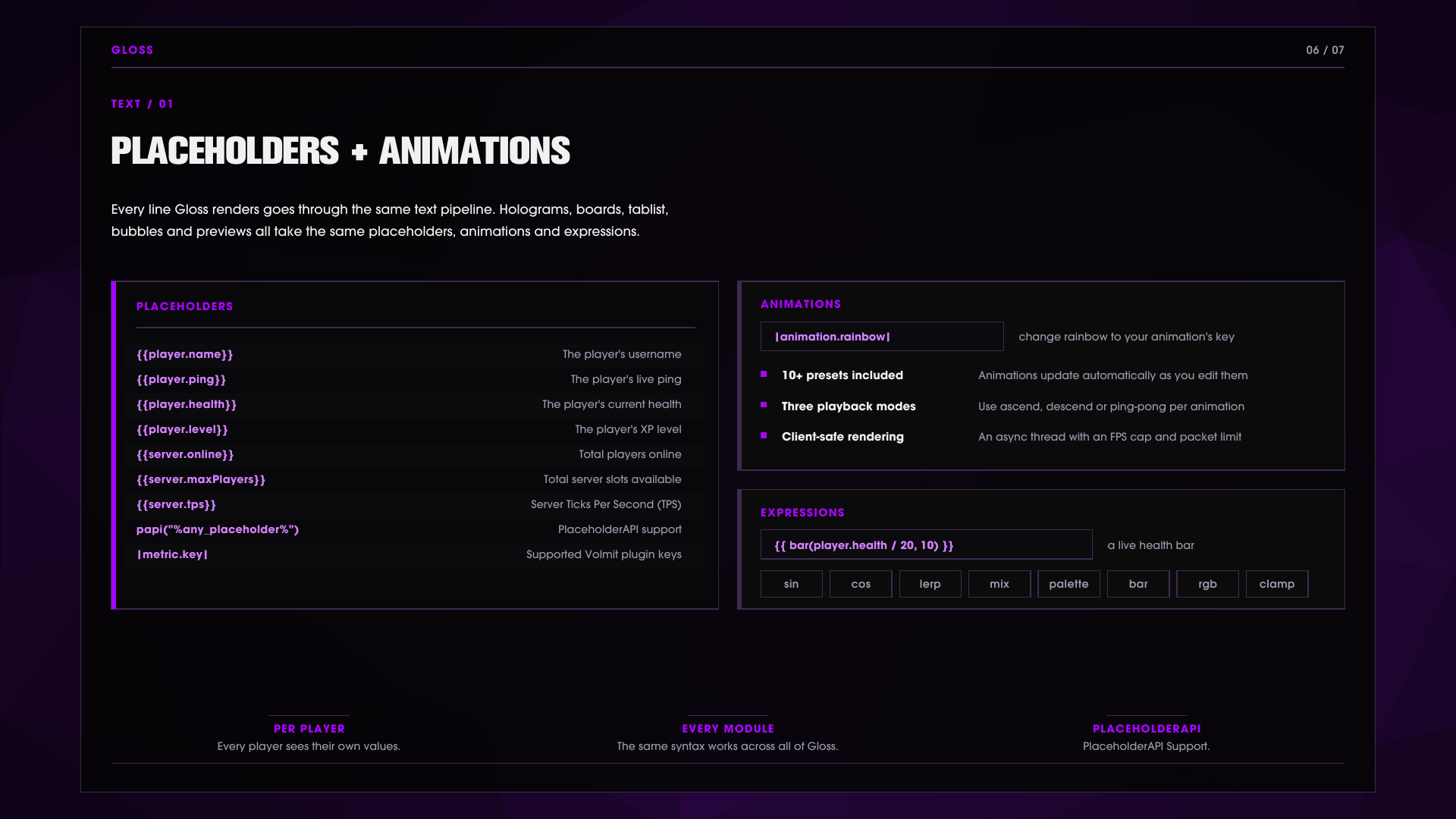
Animations 基于帧的文本动画,具有上升、下降或乒乓播放和每帧间隔。可以在任何渲染行中使用,格式为 |animation.rainbow|。
MOTD 自定义您的 MOTD,以循环显示多个 MOTD 或保持静态设计。
Tablist 标签列表支持 Gloss 的每个方面,按您的愿望进行自定义!
Placeholders and expressions
每个渲染行的全息图、记分板、标签列表、气泡、预览支持带界限的 {{ ... }} 表达式,具有本机 player.* 和 server.* 值(名称、延迟、健康、等级、在线、最大玩家、tps)。
PlaceholderAPI 是可选的,完全支持,以下是可用的 Gloss 占位符:
%gloss_available%            Shows if Gloss is available
%gloss_menu.open%            Shows if the menu is open
%gloss_menu.id%              Shows the current menu ID
表达式库在全息图、气泡、预览和掉落之间共享:clamp、lerp、smoothstep、sin、cos、rgb、mix、palette、bar、select 等,以及颜色如 #FFAA55 和完整的运算符集,带有三元运算符。
Developer API
Gloss 提供可用的 API,您可以进行挂钩,请参考我们的文档以获取更多信息。
GlossAPI api = GlossAPI.get();
api.open(myPlugin, player, "shop/main");            // open a menu
api.createHologram("welcome", location);            // manage holograms
api.createTemporaryHologram("popup", loc, 3000);    // timed hologram
api.filter(player, raw);                            // run any string through the text pipeline
api.setBoard(player, "arena");  api.setTab(player, header, footer);
此外,还有一个流畅的菜单构建器(按钮、装饰、来自文本、物品、方块、实体、图像或动画图像的图标)、带触发器和关闭原因的单击处理程序、一个 PreviewStateProvider 扩展点,以将您自己的变量馈送到容器预览卡,以及三个事件:GlossMenuOpenEvent、GlossMenuClickEvent、GlossContainerPreviewAccessEvent。
Compatibility - runtimes and Java
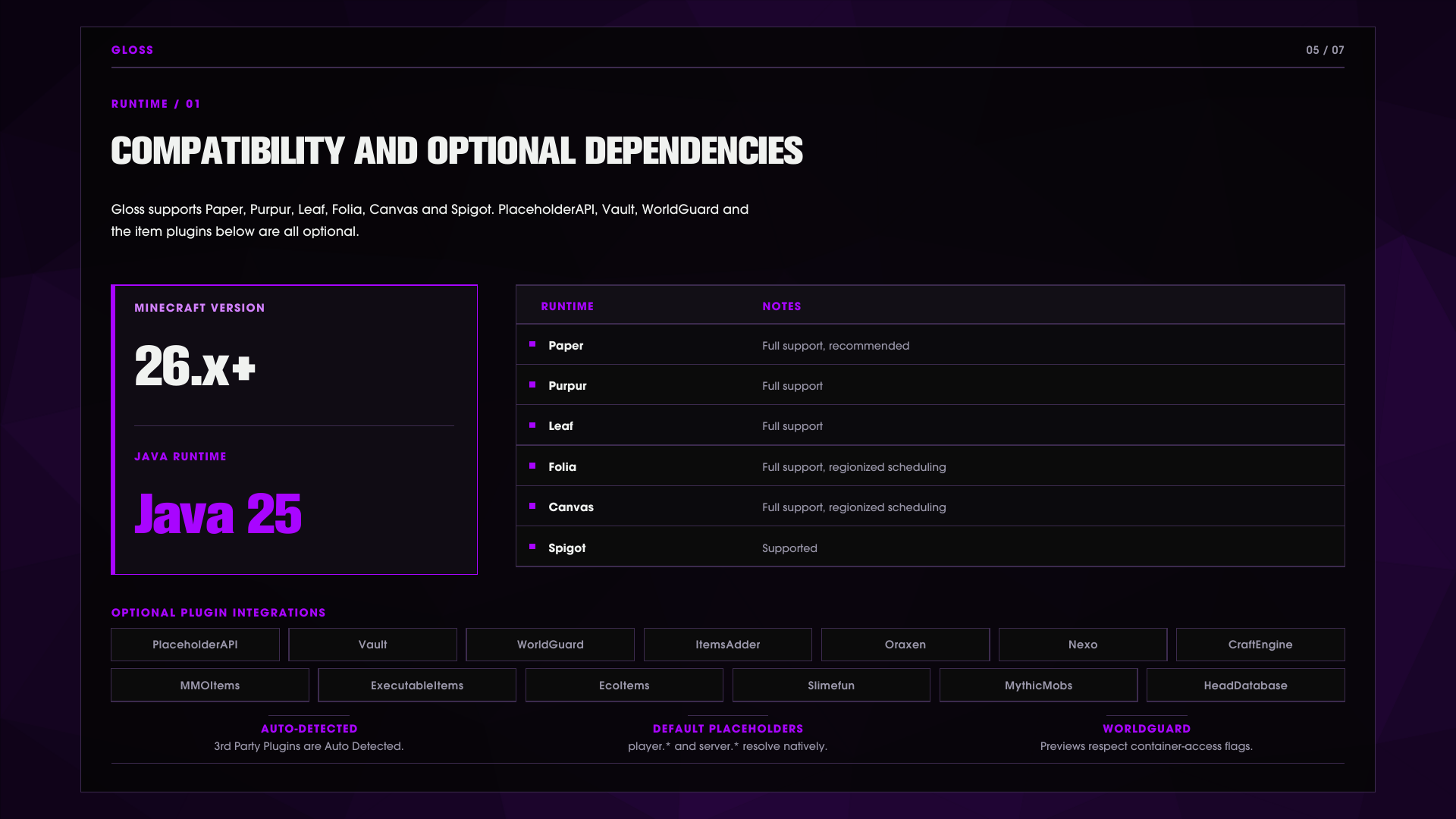
Gloss 支持 Paper、Purpur、Leaf、Folia、Canvas 和 Spigot,适用于 Java 25 的 Minecraft 26.x+
Optional integrations PlaceholderAPI、Vault、WorldGuard 和十个自定义物品提供者 - CraftEngine、ItemsAdder、Oraxen、Nexo、MMOItems、ExecutableItems、EcoItems、Slimefun、MythicMobs、HeadDatabase。提供者会自动检测,并与其插件热插拔/拔出。
Images & Media


